Now with MCP for AI assistants

One shopping list for your family — and your AI.

A calm, native iPhone list that everyone at home can add to, that is safely backed up, and that your AI assistant can read and fill for you.

  • Sharing with Family

    Everyone adds to the same list. Whoever is at the shop sees it right away.

  • Backup in the Cloud

    Sign in with Apple and your lists live in Shopping List Cloud — free.

  • MCP for AI Assistants

    Connect Claude or any MCP client. It reads, adds and checks off items.

  • Generated icons

    Every item gets its own icon and category, generated by the server.

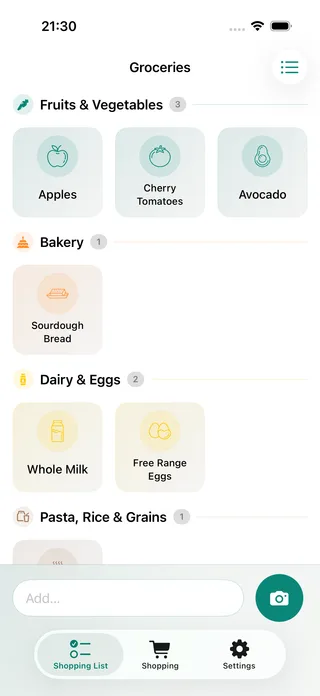
The Shopping List app with a Groceries list of category-coloured tiles: apples, cherry tomatoes, avocado, sourdough bread, whole milk and eggs

MCP for AI assistants

Talk about food. Your list keeps up.

Shopping List speaks the Model Context Protocol. Connect it to your AI assistant once, and it can see your lists, add what’s missing and check off what you bought — while you’re cooking, planning or driving.

Plan a recipe, get the shopping

Discuss a dish with your AI — it puts the ingredients on your list.

Something quick with cherry tomatoes for four tonight?

How about spaghetti with blistered cherry tomatoes, garlic and lemon? 25 minutes. You’ll need spaghetti, cherry tomatoes, garlic, a lemon, parmesan and olive oil.

Perfect. We still have olive oil — put the rest on Groceries.

add_items → Groceries · 5

Done — five items are on Groceries. Enjoy dinner!

  • Spaghetti
  • Cherry tomatoes
  • Garlic
  • Lemon
  • Parmesan

Hands-free in the car

Ask what’s on the list on the way to the shop, and add what you forgot.

Voice mode

“What’s still on our shopping list?”

get_list_items → Groceries

“Five things: milk, eggs, spinach, coffee and strawberries. Anna added the strawberries this morning.”

“Oh, and avocados — two of them.”

add_items → Avocados ×2

“Added two avocados. Drive safe!”

  • Milk
  • Eggs
  • Spinach
  • Coffee
  • Strawberries
  • Avocados ×2
  1. Go online in the app. Sign in with Apple to Shopping List Cloud, or use your own server.

  2. Add the connector. Add https://shopping-list.tueftli.com/mcp to Claude or any MCP-compatible assistant and approve access.

  3. Just ask. List, add, check off, rename or tidy up — your assistant does the typing.

Sharing with family

No more “did anyone buy milk?”

Share your lists with your household. Items added at home show up on the phone in the shop, and what’s checked off disappears for everyone.

  • A Anna added Strawberries
  • L Luca added Coffee
  • M Mia checked off Whole Milk

Generated icons

Type a word. Get a picture.

The server sorts each new item into its category and finds or draws a matching icon. The app downloads it once and keeps it, so your list stays fast and easy to scan.

Backup in the cloud

Your lists, safe — wherever you want them.

Pick a mode on first launch and switch whenever you like. Signing out keeps a copy of every list on your iPhone.

  • Offline

    Lists stay on your iPhone only. No account, nothing leaves the device.

  • Free

    Shopping List Cloud

    Sign in with Apple. Your lists are backed up, shareable and ready for AI assistants.

  • Self-hosted

    Run your own Shopping List Server and connect with an API token.

And everything a good list needs

Your next shop starts here.

Free for iPhone. Cloud included.

Download on theApp Store